USD

Electric Turret keeps rotating continuously
Video on Youtube
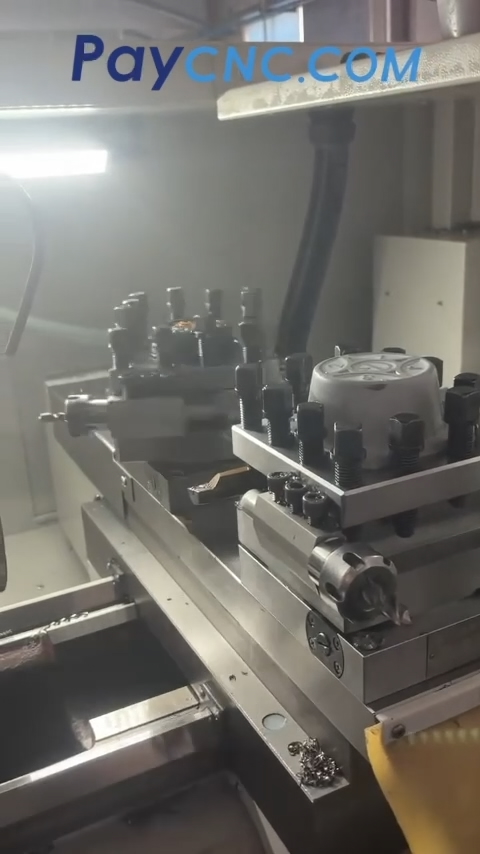
Electric Turret keeps rotating continuously
On a CNC lathe with dual turrets, one turret keeps rotating continuously as soon as the tool change button is pressed. Pressing Reset or Emergency Stop does not stop it. The turret continues rotating, while the control panel and indicator lights remain powered and operational.
The most likely cause is that the turret positioning feedback signal is not being received by the CNC, so the control keeps rotating the turret because it thinks the turret has not reached the correct position.
Possible causes:
* Turret encoder / position signal plate failure or a detached magnet: This is one of the most common causes. The turret relies on this component to send a positioning signal to the control. If the signal is lost, the turret may continue rotating indefinitely.
* Broken or loose signal wiring: The wiring inside the turret is subject to movement and rotation, making it susceptible to wear, broken wires, or poor connections.
* Contactor contacts welded together: If the forward-rotation contactor contacts are welded, the turret motor may continue running even when the control attempts to stop it. This could also explain why the Emergency Stop does not work.
* Faulty proximity switch or sensor: If the sensor cannot detect the correct turret position, the turret may continue searching for the required tool position.
Recommended troubleshooting steps:
1. Disconnect the power first and manually check whether the turret can rotate freely to rule out mechanical binding.
2. Remove the turret cover and inspect the position signal plate, check whether any magnets have come loose, and look for damaged or broken signal wires.
3. Use a multimeter to check the continuity of the signal wiring. Also inspect the contactor contacts for welding and verify that the contactor can release properly.
Do not troubleshoot this with the turret cover open while the machine is powered. If the Emergency Stop cannot stop the turret, the motor circuit may not be properly isolated. Disconnect the machine’s main power supply before inspecting or working on the electrical components.
Paycnc offers all kinds of cnc turrets and their spare parts.
If you could not find the exact model, you can send photos and nameplate to paycnc@paycnc.com to get quotation.
WhatsApp: https://wa.me/+8613925042139
#toolpost #turret
Electric Turret keeps rotating continuously
On a CNC lathe with dual turrets, one turret keeps rotating continuously as soon as the tool change button is pressed. Pressing Reset or Emergency Stop does not stop it. The turret continues rotating, while the control panel and indicator lights remain powered and operational.
The most likely cause is that the turret positioning feedback signal is not being received by the CNC, so the control keeps rotating the turret because it thinks the turret has not reached the correct position.
Possible causes:
* Turret encoder / position signal plate failure or a detached magnet: This is one of the most common causes. The turret relies on this component to send a positioning signal to the control. If the signal is lost, the turret may continue rotating indefinitely.
* Broken or loose signal wiring: The wiring inside the turret is subject to movement and rotation, making it susceptible to wear, broken wires, or poor connections.
* Contactor contacts welded together: If the forward-rotation contactor contacts are welded, the turret motor may continue running even when the control attempts to stop it. This could also explain why the Emergency Stop does not work.
* Faulty proximity switch or sensor: If the sensor cannot detect the correct turret position, the turret may continue searching for the required tool position.
Recommended troubleshooting steps:
1. Disconnect the power first and manually check whether the turret can rotate freely to rule out mechanical binding.
2. Remove the turret cover and inspect the position signal plate, check whether any magnets have come loose, and look for damaged or broken signal wires.
3. Use a multimeter to check the continuity of the signal wiring. Also inspect the contactor contacts for welding and verify that the contactor can release properly.
Do not troubleshoot this with the turret cover open while the machine is powered. If the Emergency Stop cannot stop the turret, the motor circuit may not be properly isolated. Disconnect the machine’s main power supply before inspecting or working on the electrical components.
Paycnc offers all kinds of cnc turrets and their spare parts.
If you could not find the exact model, you can send photos and nameplate to paycnc@paycnc.com to get quotation.
WhatsApp: https://wa.me/+8613925042139
#toolpost #turret