USD
USD
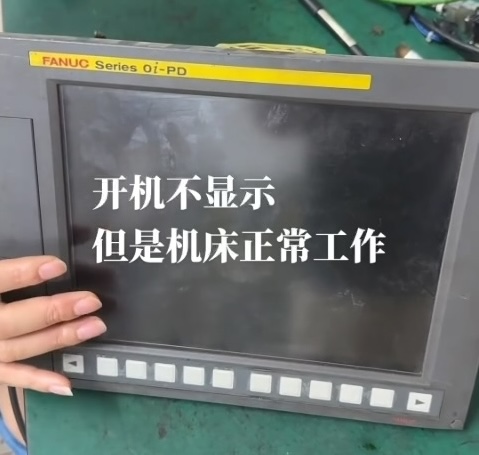
Fanuc CNC control black screen
Video on Youtube
Fanuc CNC control black screen
When a FANUC unit experiences a black screen—despite the main unit itself remaining fully operational—the root cause is typically not damage to the display screen itself.
First, perform a power-on test to verify that the unit's cooling fans are spinning and the motherboard is functioning correctly; this helps rule out failures in the core components of the main unit.
The high-voltage transformer—a slender, elongated component located inside the device—is a frequent point of failure for this type of black-screen issue.
Evidence of arcing (sparking) on the high-voltage transformer is a common defect. Rather than attempting a localized repair, it is more cost-effective to replace the entire high-voltage transformer unit.
Once the component is replaced, the display will return to normal operation.
Power-on test confirms that the cooling fans are running and the motherboard is operating normally.
Disassembly and inspection reveal signs of a short circuit in the high-voltage transformer.
Replacing the high-voltage transformer restores the display to normal operation.
Paycnc offers different kinds of Fanuc spare parts.
If you could not find the exact model, you can send item photo and its nameplate to paycnc@paycnc.com to get quotation.
#parts #fanuc
Fanuc CNC control black screen
When a FANUC unit experiences a black screen—despite the main unit itself remaining fully operational—the root cause is typically not damage to the display screen itself.
First, perform a power-on test to verify that the unit's cooling fans are spinning and the motherboard is functioning correctly; this helps rule out failures in the core components of the main unit.
The high-voltage transformer—a slender, elongated component located inside the device—is a frequent point of failure for this type of black-screen issue.
Evidence of arcing (sparking) on the high-voltage transformer is a common defect. Rather than attempting a localized repair, it is more cost-effective to replace the entire high-voltage transformer unit.
Once the component is replaced, the display will return to normal operation.
Power-on test confirms that the cooling fans are running and the motherboard is operating normally.
Disassembly and inspection reveal signs of a short circuit in the high-voltage transformer.
Replacing the high-voltage transformer restores the display to normal operation.
Paycnc offers different kinds of Fanuc spare parts.
If you could not find the exact model, you can send item photo and its nameplate to paycnc@paycnc.com to get quotation.
#parts #fanuc