USD
Zero-Setting on HNC HSV Servo Drive
Video on Youtube
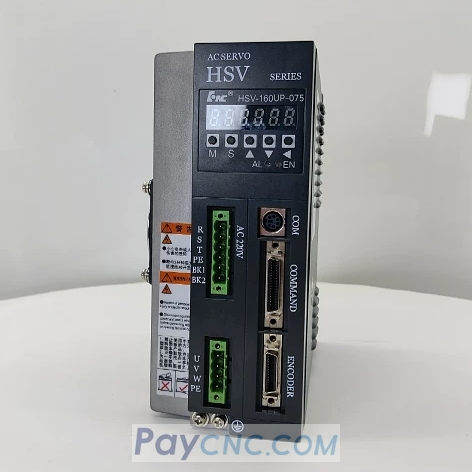
Zero-Setting Procedure for Absolute Encoders on HSV Servo Drive
This is a practical demonstration of how to zero-set an absolute encoder for a Huazhong CNC (HNC) HSV-series servo drive. In about two minutes, the presenter walks through a three-step process: locking the system, performing the zero-setting, and restoring the parameters to their original values.
Preparation and Locking (starting at 00:01): After powering on the drive, press the 'S' key, then use the 'M' key to navigate to the 'PA' interface. Locate parameter 'PA23' and change its value to '7'. Next, switch to the 'STA' interface and set 'STA-6' to '1'—the presenter notes that setting this to '1' effectively "locks" the system. Return to the 'PA' interface, change 'PA34' to '1230' (which the presenter explains is the command to "save"), and then confirm this in the 'EE' interface. A prompt beginning with the letter 'F' will appear, indicating that the settings have been saved; power the unit off and then back on.
Performing Zero-Setting (starting at 00:48): After powering the unit back on, use the 'S' and 'M' keys to navigate to the 'EE' interface. Scroll to find 'CAL-ID' and confirm, then scroll to find 'LP-SET' and confirm. Once a prompt starting with 'F' appears, the zero-setting process is complete. Power the unit off and back on again.
Restoring Parameters (starting at 01:23): Once the system is powered on, revert the previously modified parameters to their original values: set 'PA23' back to '0' and 'STA-6' back to '0'. Keep 'PA34' set to '1230', and finally, press the 'F' key in the 'EE' interface to save these changes. This concludes the entire procedure.
Important Notes
The value 'PA34=1230' appears repeatedly in the video; it functions as a "save" command rather than a parameter specific to zero-setting—do not mistake it for a dedicated zero-setting switch.
The "prompt starting with 'F'" mentioned by the presenter is the only reliable indicator that a step has been successfully applied; do not power off the unit until this prompt appears.
Paycnc offers different kinds of HSV Servo Drives
If you could not find the exact model, you can send item photo and its nameplate to paycnc@paycnc.com or WhatsApp us to get quotation.
#HSV #servo
Zero-Setting Procedure for Absolute Encoders on HSV Servo Drive
This is a practical demonstration of how to zero-set an absolute encoder for a Huazhong CNC (HNC) HSV-series servo drive. In about two minutes, the presenter walks through a three-step process: locking the system, performing the zero-setting, and restoring the parameters to their original values.
Preparation and Locking (starting at 00:01): After powering on the drive, press the 'S' key, then use the 'M' key to navigate to the 'PA' interface. Locate parameter 'PA23' and change its value to '7'. Next, switch to the 'STA' interface and set 'STA-6' to '1'—the presenter notes that setting this to '1' effectively "locks" the system. Return to the 'PA' interface, change 'PA34' to '1230' (which the presenter explains is the command to "save"), and then confirm this in the 'EE' interface. A prompt beginning with the letter 'F' will appear, indicating that the settings have been saved; power the unit off and then back on.
Performing Zero-Setting (starting at 00:48): After powering the unit back on, use the 'S' and 'M' keys to navigate to the 'EE' interface. Scroll to find 'CAL-ID' and confirm, then scroll to find 'LP-SET' and confirm. Once a prompt starting with 'F' appears, the zero-setting process is complete. Power the unit off and back on again.
Restoring Parameters (starting at 01:23): Once the system is powered on, revert the previously modified parameters to their original values: set 'PA23' back to '0' and 'STA-6' back to '0'. Keep 'PA34' set to '1230', and finally, press the 'F' key in the 'EE' interface to save these changes. This concludes the entire procedure.
Important Notes
The value 'PA34=1230' appears repeatedly in the video; it functions as a "save" command rather than a parameter specific to zero-setting—do not mistake it for a dedicated zero-setting switch.
The "prompt starting with 'F'" mentioned by the presenter is the only reliable indicator that a step has been successfully applied; do not power off the unit until this prompt appears.
Paycnc offers different kinds of HSV Servo Drives
If you could not find the exact model, you can send item photo and its nameplate to paycnc@paycnc.com or WhatsApp us to get quotation.
#HSV #servo